
Online security is changing as people manage more of their personal, professional, and financial activities through digital accounts. Traditional passwords have been the foundation of account protection for decades, but they also create persistent problems. Users frequently forget passwords, reuse the same credentials across different websites, or choose combinations that are easy to guess. Even strong passwords can be stolen through phishing attacks, data breaches, and malicious software. These challenges have encouraged technology companies to develop more secure and convenient authentication methods, including passkeys.
Passkey security offers an alternative to conventional password-based login by allowing users to authenticate through cryptographic credentials stored on supported devices or managed by compatible password managers. Depending on the device and service, authentication may involve a fingerprint, facial recognition, a device PIN, or another local verification method. Instead of repeatedly entering a secret password, users approve access through a trusted authentication process. This approach can make account access easier while reducing exposure to several common online attacks.
As digital identity protection becomes increasingly important, passkeys are gaining attention across websites, mobile applications, business platforms, and consumer services. Readers exploring modern authentication trends through techloomz com can benefit from understanding how this technology works, what makes it different from traditional passwords, and where its limitations remain. Learning the fundamentals helps individuals and organizations make better decisions about protecting their digital identities in an increasingly connected world.
What Is Passkey Security?
Passkey security is an authentication approach that uses public-key cryptography to verify a user’s identity without requiring a traditional account password. When someone creates a passkey for a compatible service, the authentication system establishes a cryptographic key pair. The private key remains protected by the user’s device, password manager, or another supported credential provider, while the corresponding public key is registered with the online service. During login, the service uses cryptographic verification to confirm that the user controls the appropriate private key.
The important difference is that the website does not need to store a conventional password that an attacker could steal and reuse. Authentication instead depends on a cryptographic challenge that the legitimate credential can answer. Many passkey implementations also require local user verification, such as a fingerprint, face scan, or device PIN, before authorizing authentication. The exact experience varies by platform and configuration, but the underlying goal remains the same: make account access more secure without requiring users to remember and type a separate password for every service.
Passkeys are commonly associated with standards developed by the FIDO Alliance and the World Wide Web Consortium. They build on established authentication technologies rather than relying on a simple replacement password. This distinction matters because passkeys are designed to address weaknesses in how passwords are created, stored, transmitted, and entered across websites.
How Passkeys Work Behind the Scenes
Creating a Passkey
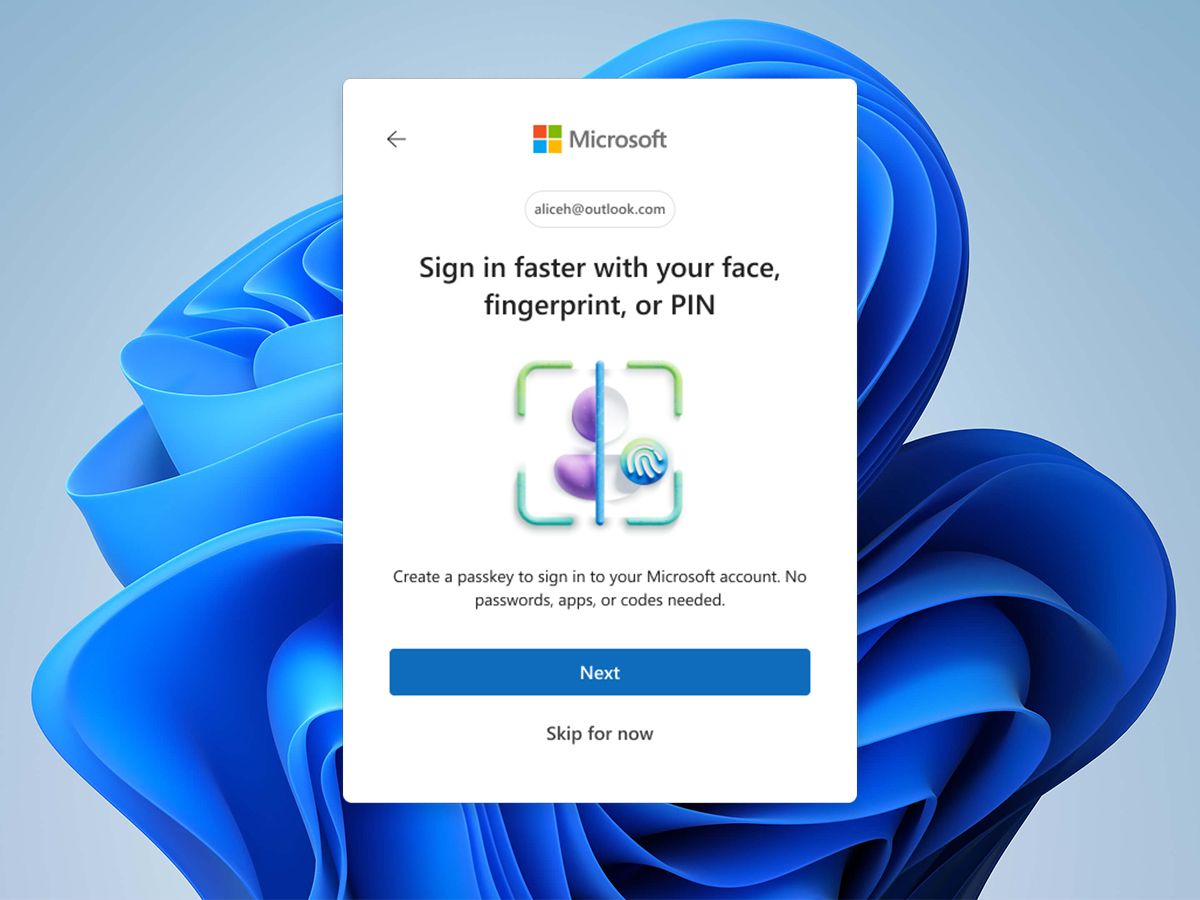
When a user selects the option to create a passkey on a supported website or application, the service requests a new authentication credential. The device or credential manager generates the necessary cryptographic keys and securely retains the private key. The public key is then registered with the service so that future login attempts can be verified. The process usually happens in the background, allowing users to establish authentication without understanding the underlying mathematics.
For example, imagine creating a passkey for an online shopping account. Rather than choosing another password, you approve passkey creation on your smartphone or computer. The device may request a fingerprint or PIN to confirm that you are authorized to create the credential. After setup, a compatible login screen can offer the passkey as an alternative to entering a username and password. The experience is designed to be straightforward, although the available options depend on the service and device.
Signing In With a Passkey
During a passkey login, the online service sends a cryptographic challenge to the user’s device or credential provider. The private key signs the challenge, and the service verifies the resulting response using the registered public key. If the verification succeeds and any required user verification is satisfied, the service grants access.
This process helps prevent attackers from using a stolen password database to sign in because a public key alone cannot generate the required private-key signature. Passkeys are also designed to resist phishing by binding authentication to the legitimate website or application identity. A fake website generally cannot obtain a valid authentication response for the genuine service’s domain. However, passkeys do not eliminate every security risk. Malware, compromised devices, stolen active sessions, and poorly implemented account recovery systems can still create opportunities for attackers.
Passkeys vs. Traditional Passwords
Passwords depend heavily on users making good security decisions. People must create sufficiently strong credentials, store them safely, avoid reuse, and recognize fraudulent login pages. Even users who follow these practices may encounter compromised websites or password databases. Adding multifactor authentication can improve protection, but some methods, particularly SMS-based verification, remain vulnerable to attacks such as SIM swapping and social engineering.
Passkeys change the authentication model by replacing a reusable shared secret with cryptographic proof. The private key is not normally sent to the website, and a properly implemented passkey cannot simply be copied from a public-key database to impersonate the account holder. This can reduce several risks associated with credential theft and phishing.
| Feature | Traditional Passwords | Passkeys |
|---|---|---|
| Login method | Enter a username and password | Approve cryptographic authentication |
| Secret storage | Password stored by the user and a verifier by the service | Private key protected by a device or credential manager |
| Phishing resistance | Depends on user awareness and additional protections | Designed to resist authentication on the wrong website |
| Memorization | Usually requires remembering or managing credentials | No separate password to remember |
| Reuse risk | Users may reuse passwords across services | Credentials are associated with individual services |
| Recovery | Password reset or recovery process | Recovery through supported devices, synced credentials, or account procedures |
| Device flexibility | Generally works anywhere the password is accepted | Depends on credential synchronization and supported authentication methods |
Although passkeys offer important advantages, password-based authentication will not disappear immediately. Some services do not support passkeys, while others maintain passwords as a fallback or account recovery option. Organizations also need to consider legacy systems, accessibility requirements, shared devices, and employee training before changing their authentication policies.
Why Passkeys Are Becoming More Important in 2026
Growing Phishing and Credential Theft Risks
Phishing remains a major challenge because attackers can imitate legitimate websites, send convincing messages, and pressure users into revealing sensitive information. Password managers and multifactor authentication can help, but the effectiveness of different defenses depends on the attack method. Passkeys provide a stronger foundation against conventional credential phishing because the authentication process is tied to the legitimate service’s identity.
For example, a fraudulent login page might persuade someone to enter a familiar password, but it generally cannot complete a properly implemented passkey authentication for another website’s domain. This reduces the chance that a user will unknowingly provide reusable credentials to an attacker. Nevertheless, people should remain alert to suspicious messages, unexpected authentication requests, and fraudulent account recovery communications.
Increasing Demand for Convenient Authentication
Digital services compete to provide experiences that are both secure and easy to use. Password resets, verification codes, and repeated login failures can frustrate customers and create additional work for support teams. Passkeys can reduce these difficulties by simplifying authentication while preserving strong cryptographic protections.
For businesses, fewer password-related problems may translate into lower support costs and a smoother customer experience. For individuals, the benefit is straightforward: signing in can require a simple device verification instead of remembering another complicated password. As more devices and applications support passkeys, this combination of usability and security is likely to remain an important consideration in digital product development.
The Main Benefits of Passkey Authentication
Passkeys offer several practical advantages for individuals and organizations. Their value comes from combining strong authentication technology with a login process that reduces dependence on human memory and judgment.
The most important benefits include:
- Stronger phishing resistance: Authentication is designed to work with the legitimate website or application identity.
- Reduced password exposure: Users do not need to transmit a traditional password during passkey authentication.
- Simpler account access: Device verification can replace typing and remembering separate passwords.
- Lower password reuse risk: Each service can use its own cryptographic credential rather than relying on a shared password.
- Improved login experience: Fewer password resets and forgotten credentials can reduce everyday friction.
These benefits are especially useful for accounts containing sensitive information, including email, cloud storage, business systems, and financial services. However, the actual level of protection depends on implementation quality, device security, recovery procedures, and how the service handles alternative authentication methods.
Common Challenges and Limitations of Passkeys
Device Loss and Account Recovery
One concern users often have is what happens when they lose a phone, replace a computer, or reset a device. The answer depends on how their passkeys are stored. Some passkeys are synchronized through a compatible credential manager, while others may remain tied to a particular device or security key. Synchronization can make switching devices easier, but it also introduces dependence on the security and recovery procedures of the credential provider.

Users should understand their service’s recovery options before relying entirely on passkeys. Keeping another supported device, setting up a suitable recovery method, or registering an additional passkey where available can reduce the risk of being locked out. Recovery information must be protected carefully because attackers may target account recovery processes when direct authentication is difficult.
Compatibility and Adoption
Not every website, application, operating system, or workplace system supports passkeys in the same way. Some platforms offer a complete passkey experience, while others provide only partial support or continue to depend on passwords. Older devices and specialized business environments may also have compatibility limitations.
Organizations adopting passkeys must evaluate their existing identity systems, employee devices, customer requirements, and technical infrastructure. A gradual rollout can help identify problems before the technology becomes a primary authentication method. Clear instructions and accessible alternatives are also important for users who have older devices, need assistive technology, or cannot use biometric verification.
Understanding the Remaining Security Risks
Passkeys strengthen the authentication process, but they cannot protect every stage of an online interaction. An attacker who compromises a user’s device may attempt to steal session cookies, install malware, or exploit other weaknesses after login. Social engineering can also target users through fake support calls or fraudulent recovery requests.
Another consideration is the security of synchronized credentials. Depending on the provider and implementation, passkeys may be available across multiple devices through a cloud-based credential manager. Users should protect the associated account with strong authentication and keep their devices updated. Security teams should combine passkeys with monitoring, session management, access controls, and appropriate incident response procedures rather than treating them as a complete solution on their own.
How to Start Using Passkeys Safely
Moving to passkeys does not require changing every account at once. A practical approach is to begin with important services that already support the technology, understand the recovery process, and expand gradually as compatibility improves.
Consider the following steps when setting up passkeys:
- Check account settings: Look for a passkey or passwordless login option in the security section of a supported service.
- Use a trusted credential manager: Choose a supported provider or device-based option that fits your security and synchronization needs.
- Prepare for device changes: Confirm how to restore access if your phone or computer becomes unavailable.
- Secure recovery methods: Protect recovery email accounts, backup codes, and other alternative authentication options.
- Review active sessions: Remove unfamiliar devices and sign out of sessions you no longer use.
After setup, test the login and recovery process while your existing access method is still available. Do not delete your only recovery option until you have confirmed that the passkey works and that you can regain access if necessary. For work accounts, follow the organization’s approved security procedures rather than creating an independent authentication arrangement that conflicts with company policy.
The Role of Passkeys in Business and Enterprise Security
Businesses face additional authentication challenges because employees access internal applications, customer databases, collaboration tools, and cloud infrastructure from different locations. Password reuse and phishing can expose several systems if an attacker compromises a single credential. Passkeys can help organizations reduce these risks by strengthening the login process and making phishing-resistant authentication more accessible.
Successful implementation requires more than enabling a new login button. IT teams need to assess identity providers, access policies, device management, user onboarding, and account recovery. Administrators should also consider how passkeys interact with single sign-on, privileged accounts, and existing multifactor authentication requirements. For particularly sensitive environments, hardware security keys or managed authentication devices may be appropriate, depending on the organization’s threat model.
Businesses should measure adoption, login success, support requests, and security incidents during deployment. These indicators can reveal whether the new system is improving usability without creating unacceptable access problems. A well-planned rollout combines technical controls with employee education, clear recovery procedures, and ongoing monitoring.
What the Future Holds for Password-Free Authentication
The development of password-free authentication reflects a broader shift toward digital identity systems that are easier to use and harder to exploit. Passkeys are part of this transition, alongside hardware security keys, device-bound credentials, and improvements in identity verification. As platforms continue to expand compatibility, users may encounter passwordless login more frequently when accessing everyday applications.
However, the transition will take time. Different services have different security requirements, and some will retain passwords or other fallback mechanisms for years. Cross-device synchronization, account recovery, accessibility, and support for older systems will influence how quickly adoption progresses. The most effective solutions will be those that provide strong protection without making legitimate access unnecessarily difficult.
For readers following developments through techloomz com, the central lesson is that modern authentication should be evaluated as part of a broader security strategy. Passkeys can reduce exposure to common password attacks, but users and organizations still need secure devices, careful recovery planning, and sensible access management.
Conclusion
Passkey security represents a meaningful improvement in how people authenticate themselves online. By using public-key cryptography instead of conventional reusable passwords, passkeys can reduce phishing risks, limit exposure to stolen credentials, and simplify the login experience. Their integration with device verification also makes strong authentication more convenient for everyday users. Despite these advantages, passkeys are not a guarantee against every form of cyberattack. Device compromise, session theft, weak recovery procedures, and inconsistent platform support remain important considerations. Individuals should adopt passkeys on supported high-value accounts, protect their credential managers, and maintain secure recovery options. Organizations should evaluate compatibility, train users, and integrate passkeys into a broader identity and access management strategy.